Designer Docs
This documentation is still being finalized and may change as the product evolves.
Your job is straightforward: keep the plugin streaming and hand developers the TokenIgnite file id. They connect their running UI; you keep working in Figma. For the overall workflow and glossary, start with How it works. For the developer-side setup, see Developer Docs.
1. Prerequisites
- A Figma file with Variables (collections / modes)
- Access to the TokenIgnite Figma plugin (Public Beta / Early Access)
- A developer who will connect their runtime to your file id
You do not need to set code syntax in Figma first. TokenIgnite can generate names and write them back into Dev Mode when missing. If you already defined WEB code syntax, that value keeps absolute priority.
2. Quick start
- Install the TokenIgnite Figma plugin.
- Open your design file and run the plugin.
- Sign up or sign in (Figma, Google, or email).
- Confirm streaming via the status line and sync flames.
- Copy the TokenIgnite file id (shape like
tokenignite-096149). - Send that id to your developer — not the Figma file key, not a share link.
3. What matters day to day
| Concept | For you |
|---|---|
| TokenIgnite file id | Stream id in the plugin. Click the file-id block to copy. This is what developers put in config. |
| Someone must stay signed in | Live updates need at least one person with the plugin open and signed in on the file. Then changes from teammates (or Figma AI) sync even if they do not have the plugin open. If nobody has the plugin open, nothing streams. |
| Code syntax | Existing Figma WEB syntax wins. Missing syntax can be backfilled into Dev Mode; your manual syntax is never overwritten. |
| Collections / modes | You author them in Figma. Developers activate modes as collectionName:modeName on data-ti-context. |
| Export | Streaming is for live review. Developers export CSS after the team approves what they see. |
4. How names are built
Contexts
Collection and mode names become normalized segments (lowercase kebab-case; leading number prefixes like 1- stripped; emojis/special characters removed):
collectionName:modeNameExample: Color Modes + Dark Mode → color-modes:dark-mode. Plugin filters show the same labels developers paste into data-ti-context.
CSS variable names
Without WEB code syntax, TokenIgnite builds --{group-path}-{variable-name} (collection and mode are not in the CSS name). Path segments join with - and normalize to kebab-case. Explicit WEB code syntax still wins.
--spacing-gap-2xl: 32px;Variable 2xl under groups Spacing → Gap → --spacing-gap-2xl.
5. Day-to-day workflow
- Keep the TokenIgnite plugin open while you work.
- Edit variables as usual (values, modes, collections).
- Check Current Tokens and sync status.
- Ask your developer to confirm the change in their running UI.
- Iterate until it looks right — then the developer exports.
If something stalls: use Refresh in the hint row. It force-hard-reconciles from Figma and backfills missing WEB syntax in the background (batched so the plugin stays responsive). On large files, syntax on a variable you have open can appear a moment later; live sync into the browser does not wait for that Figma write-back.
6. Variable counts (Public Beta)
| Limit | Meaning |
|---|---|
| Soft ~500 | Readable exported CSS and easier review — a recommendation, not a performance cliff. |
| Hard 5000 | Public Beta maximum Figma variables per file. Above this, the plugin blocks or freezes live writes. |
Need more tokens for maintainability: split files (e.g. foundations vs product) and connect each with its own TokenIgnite file id.
7. Plugin interface
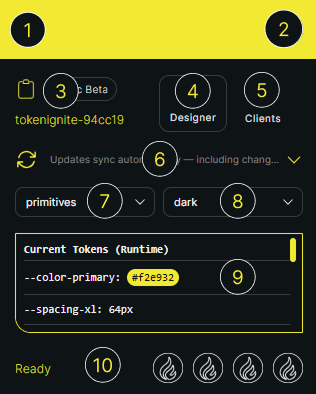
| # | Area | What it does |
|---|---|---|
| 1 | Brand / logo | Plugin header |
| 2 | User menu (avatar) | Workspace, Sign out |
| 3 | File id + plan badge | Click to copy file id; badge shows plan (e.g. Public Beta) |
| 4 | Designer count | Online designers on this file |
| 5 | Clients count | Connected developer runtimes on the stream |
| 6 | Hint row + Refresh | Status text; force hard reconcile (+ syntax backfill when needed) |
| 7 | Collection filter | Limits the token list (normalized collection labels) |
| 8 | Mode filter | Limits the token list (normalized mode labels) |
| 9 | Current Tokens | Live token list for the selected collection/mode |
| 10 | Status + sync flames | Connection / sync while updates publish |
8. Accounts and handoff
A designer needs an account to sign in to the plugin and keep the stream running. The handoff to developers is simple: share the TokenIgnite file id. That id connects the Figma file to the developer runtime. Workspace membership is separate and is not granted by the file id alone.
9. Troubleshooting
| Symptom | Fix |
|---|---|
| Developer sees no updates | Confirm status/flames show streaming; re-copy and resend the file id; confirm they used that id (not the Figma key) |
| Others edit, but nothing goes live | Keep the plugin open and signed in for at least one person on the file |
| File id missing / copy disabled | Sign in again; wait for the file to bind; check network |
| Tokens look stale or filtered wrong | Adjust collection/mode filters; use Refresh |
| Code syntax empty in Dev Mode after Refresh | Backfill is async and batched — wait briefly or reopen the variable; set explicit WEB syntax if you need a fixed name |
| “Unavailable” / dimmed UI | Restore network reachability; reopen the plugin |