Public Beta
Starter
Modes
Run
Sync
Align
Features
CSS Runtime
CSS Engine
CSS Export
SSoT Creation
SSoT Visualization
SSoT Snapshot
SSoT History
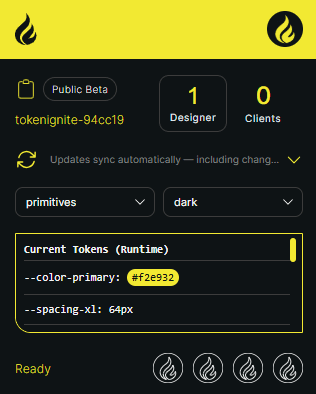
TokenIgnite instantly streams Figma variables directly into your local development environment, seamlessly bridging the gap between design and code. The second a token is updated or added in Figma—whether by a human or an AI agent—your entire team validates the live UI and co-iterates together inside a secure local runtime engine.
Traditional tools overwrite your local code for every minor design tweak. TokenIgnite applies these changes live in your browser runtime instead. Your repository files remain untouched while you iterate.
AI tools generate layout code blindly without visual runtime awareness. TokenIgnite instantly exposes where an LLM caused design drift.
Ship AI-generated frontends without losing control. You remain the final visual firewall, ensuring full UI integrity at the speed of AI generation.
Stop auditing messy AI code just to check if paddings and theme boundaries are right. TokenIgnite surfaces design drift directly in your browser, letting you spot token mismatches instantly.
TokenIgnite reads the code syntax directly from Figma. If custom properties are missing, it generates them dynamically and writes them back into the Figma file. An LLM connected to the Figma MCP uses them in component scope; TokenIgnite injects them into the root and theme scope of the live app.
Pipelines lack the live UI context. Instead of continuous integration, TokenIgnite leverages continuous injection so you can test instantly and export when it's perfect.
One design tweak instantly updates all connected dev environments worldwide. Skip the build pipelines and let your team and their AI agents co-iterate live.
Alena
Berlin
Dev
Kenji
Tokyo
Dev
Liam
Miami
Dev
Alter tokens or delete modes, and watch the layout react instantly across all clients. Catch regressions globally, ensuring no remote environment falls out of sync.
Inject new token sets or entire design modes with zero rebuilds. Data streams straight into every local runtime, allowing your team and their AI agents to instantly continue iterating.
Connect design and development – completely without overhead. Run TokenIgnite easily within your local development environment as a lightweight, dev-only dependency.
npm i -D tokenignite
npx tokenignite init"files": [
{
"id": "tokenignite-94cc19",
"name": "global-foundation"
}
]if (process.env.NODE_ENV === "development") {
import("tokenignite").then(({ initTokenIgnite }) => initTokenIgnite())
}The future of your workflow begins in the runtime: Be there from the start and take your processes to the next level. Upcoming governance features build on TokenIgnite's runtime-first approach.
Run
Sync
Align
CSS Runtime
CSS Engine
CSS Export
SSoT Creation
SSoT Visualization
SSoT Snapshot
SSoT History
Run
Sync
Align
CSS Runtime
CSS Engine
CSS Export
SSoT Creation
SSoT Visualization
SSoT Snapshot
SSoT History
Run
Sync
Align
CSS Runtime
CSS Engine
CSS Export
SSoT Creation
SSoT Visualization
SSoT Snapshot
SSoT History
TokenIgnite acts as a lightweight injection layer, connecting your Figma styles directly to your local runtime while keeping your codebase clean and production builds native.
If you don't validate your tokens inside a running web engine while you work, you are guessing. See your design system behave like real code instantly inside your local environment - and across the globe. Start the Public Beta today.