Make design decisionswhere they matter.
Stop waiting for code rebuilds or build pipelines. TokenIgnite combines Figma variables with a realtime database and the native mechanics of CSS custom properties to sync your design decisions directly into the browser—enabling designers and developers to collaborate live, iterate together, and validate design decisions right where it matters: in the runtime.
Continuous Injection over Continuous Integration.
Traditional pipelines bundle web app design decisions into heavy software builds. TokenIgnite uses Continuous Injection: streaming variables directly into the active browser instance for immediate live testing. Git pipelines trigger only when the design is fully ready.
The common way
The Ignite way
Visual Proof for Every Prompt.
LLMs write UI code in seconds. TokenIgnite connects Figma Variables directly to the running app, giving designers and developers a space to explore, adjust, and refine visual decisions in real time—right where the UI comes to life.
TokenIgnite
Human-in-the-Loop
Ship AI-generated frontends without losing control. You remain the final visual firewall, ensuring full UI integrity at the speed of AI generation.
Code-Free Review
Review paddings, theme boundaries, and token changes directly in your browser. TokenIgnite makes their visual impact in the running app immediately visible, so you can spot and refine differences in real time.
The Process
TokenIgnite reads code syntax directly from Figma, generates missing custom properties, and writes them back into the Figma file. An AI agent connected to the Figma MCP Server can use them within the component scope. TokenIgnite injects the same properties into the running app's root and theme scopes.
Stream UI changes globally.
One design tweak instantly updates all connected dev environments worldwide. Skip the build pipelines and let your team and their AI agents co-iterate live.
--border-radius:48px;
Alena
Berlin
Dev
Kenji
Tokyo
Dev
Liam
Miami
Dev
Spot Live Breaks
Alter tokens or delete modes, and watch the layout react instantly across all clients. Catch regressions globally, ensuring no remote environment falls out of sync.
Hot-swap context
Inject new token sets or entire design modes with zero rebuilds. Data streams straight into every local runtime, allowing your team and their AI agents to instantly continue iterating.
Connect Figma and Code in seconds.
Connect design and development – completely without overhead. Run TokenIgnite easily within your local development environment as a lightweight, dev-only dependency.
Ignite design
Open the Figma plugin
Sign up with Figma, Google, or email
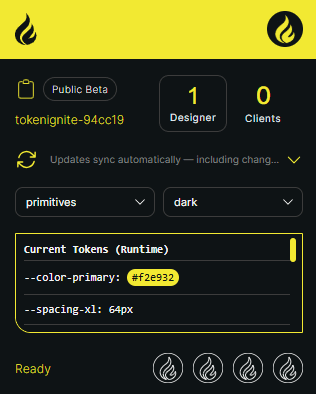
Copy the TokenIgnite file id from the plugin
Send the TokenIgnite file id to your Dev
Ignite dev
Install the npm Package, then scaffold the config
npm i -D tokenignite
npx tokenignite initAdd the TokenIgnite file id to tokenignite.config.json
"files": [
    {
      "id": "tokenignite-94cc19",
      "name": "global-foundation"
    }
]Inject the runtime snippet into your layout
if (process.env.NODE_ENV === "development") {
  import("tokenignite").then(({ initTokenIgnite }) => initTokenIgnite())
}Start the live run session in your terminal
See it in action.
FAQ.
Make bulletproof design decisions.
Experience design decisions in real time. See for yourself how TokenIgnite transforms your workflow.